


Digital Kiosk
Your Professional Digital Kiosk Supplier!
Hengstar, founded in 2004, leverages over 20 years of expertise to deliver innovative Digital Kiosk solutions. These Digital Signage kiosks feature dynamic content playback, interactive touch capabilities, and remote content management, enabling engaging user experiences while reducing operational costs. With durable construction and customizable layouts, Hengstar’s kiosks allow flexible display of videos, images, or text, support self-service functions, and integrate with e-commerce to boost sales, making them ideal for retail, public spaces, and commercial environments.


Why Choose Us
Professional Team
The company has a professional R&D team composed of top talents in the industry, with strong technical innovation capabilities and rich project experience.
Quality Control
The company provides leading display technology, mature automation control solutions, and perfect supply chain management services to ensure the stability and reliability of product quality.
Patents and Certifications
The company has 15 independent intellectual property use patents and 5 invention patents, and has CCC, CQC, CE, SGS certifications in the electrical industry, industry production licenses, and ISO9000 system certifications.
Advanced Equipment
The company is equipped with five digital signal generators, three automated production lines, a 500-square-meter Class 100 automatic bonding workshop, a 100-square-meter aging workshop, 30 automated assembly motors and other advanced equipment.
Our Best-Selling Digital Kiosk

Digital Touch Kiosk
The digital touch kiosk is a versatile and interactive self-service terminal that allows users to engage with digital content through a touchscreen interface. These kiosks are available in various sizes, including 32 inch, 43 inch, 49 inch, 55 inch, and 65 inch options.

Floor Standing Digital Kiosk
The floor standing digital kiosk is a self-contained, standalone interactive display system widely used in public spaces for applications such as advertising, information dissemination, ticketing, and customer interaction.

Digital Kiosk Display
The digital kiosk display is designed to combine sleek aesthetics with practical functionality, making it the ideal solution for interactive and informational displays in various environments.
Digital Kiosk Specification
|
Parameter Category |
Specific Parameters |
|
Size Range |
Varying from 32 inches to 65 inches |
|
Resolution |
Full HD 1920x1080 or 4K |
|
Touch Screen Technology |
Capacitive or infrared touch screen technology |
|
Operating System |
Android or Windows operating system |
Enhanced Customer Experience (CX)
Digital kiosks provide a convenient, user-friendly way for customers to access services, make purchases, and find information quickly. By reducing wait times and offering 24/7 availability, kiosks improve overall customer satisfaction and engagement.
Increased operational efficiency
By automating routine tasks like check-ins, payments, and information retrieval, digital kiosks free up staff to focus on more complex or personalized services. This streamlines operations and helps businesses serve more customers with fewer resources.
Cost savings
Deploying digital kiosks can reduce labor costs by minimizing the need for additional staff to handle routine tasks. Over time, the initial investment in kiosks can lead to significant cost savings through improved efficiency and reduced staffing needs.
Data collection and analytics
Digital kiosks can gather valuable data on customer behavior, preferences, and usage patterns. This data can be analyzed to optimize services, tailor offerings, and improve decision-making, helping businesses stay competitive.
Marketing and advertising opportunities
Kiosks can be used as powerful marketing tools, displaying targeted ads, promotions, and brand messages directly to users. This offers businesses a unique way to reach customers at the point of interaction, increasing the impact of their marketing efforts.
Digital Kiosk Hardware
Touchscreen display: The most visible part of your typical digital kiosk, the touchscreen display allows users to interact by selecting options, entering information, or making transactions.
Processor: The kiosk’s “brain,” this component handles all computing tasks, processes user inputs, and ensures the smooth operation of the kiosk.
Card reader/payment terminal: Many kiosks are equipped with card readers or payment terminals to facilitate transactions, such as purchasing tickets or paying bills.
Printer: Some kiosks include printers for dispensing receipts, tickets, or other printed materials.
Camera and scanner: These components might be used for identity verification, document scanning, or barcode reading.
Connectivity hardware: To integrate with other systems, kiosks often have components like Wi-Fi, Ethernet, or cellular modems for internet connectivity.
Digital Kiosk Software
Operating system
The underlying software that manages hardware resources and runs the kiosk applications, typically a specialized version of Windows, Android.
Kiosk management software
This software controls the kiosk’s functionality, user interface, and security features. It also allows for remote management and monitoring of the kiosk’s performance.
User Interface (UI)
The interactive layer of software that users engage with, designed to be simple and easy to navigate. It includes menus, buttons, forms, and other elements that guide the user through their experience.
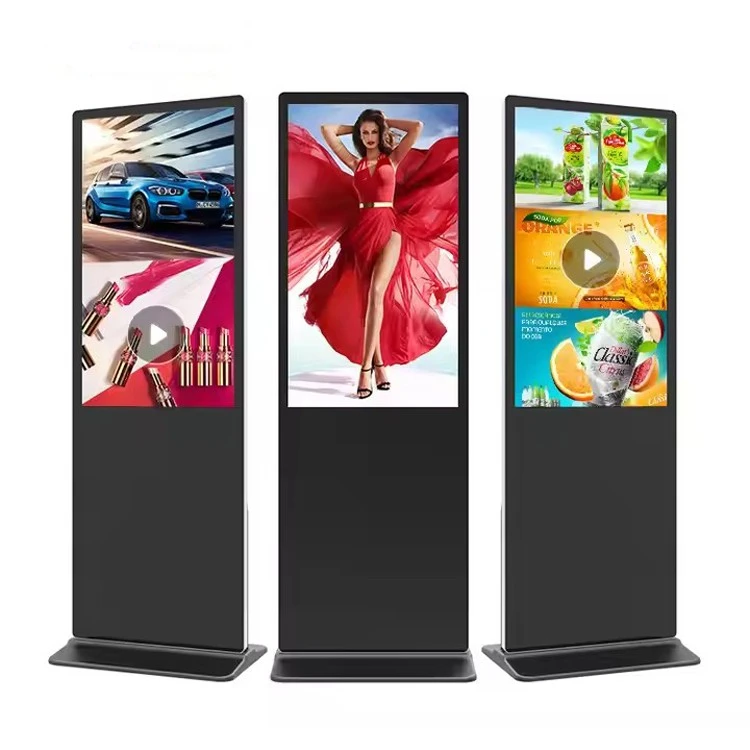
Examples of Digital Kiosks Across Various Industries
Corporate
Digital kiosks in corporate environments can display company announcements, upcoming events, and wayfinding directions for visitors.
Retail
Retailers use digital kiosks to showcase product information, promotions, and digital menus, enhancing the shopping experience and driving sales.
Hospitality
Hotels and restaurants utilise digital kiosks for menu displays, promotional content, and wayfinding to improve guest experiences.
Healthcare
In healthcare settings, digital kiosks provide essential information, such as clinic schedules, health tips, and wayfinding directions for patients and visitors.
Education
Educational institutions use digital kiosks to share campus news, event information, and class schedules, keeping students and staff informed.
Government
Government offices use digital kiosks for public announcements, queue management, and wayfinding, improving service efficiency for citizens.
Packaging and Shipping
|
Packaging |
Foam, paper box |
|
Transportation methods |
Road transport, rail transport, sea transport, air transport |
Our Certificate


FAQ
We're professional digital kiosk manufacturers in China, specialized in providing high quality customized service. We warmly welcome you to buy digital kiosk in stock here and get pricelist from our factory. For price consultation, contact us.
Floor Standing Digital Kiosk