


Monitor
Your Professional Monitor Supplier!
Monitor technology serves as the core visual output for human–machine interaction, converting graphics signals into clear, readable images. Today’s market has evolved from traditional CRT displays to advanced LCD-based solutions, offering thinner designs, lower power consumption, and improved reliability. Modern LCD panels—such as IPS, VA, and TN—balance color accuracy, viewing angles, and response time, while newer developments like OLED continue to expand performance boundaries.
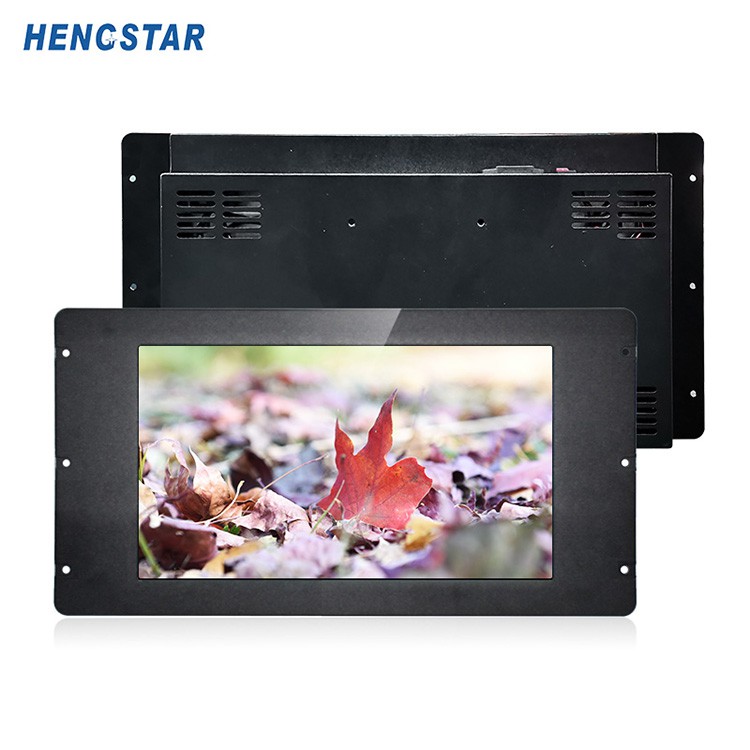
In practical applications, monitors are further categorized to meet different environments and use cases, including Desktop Monitor for everyday workstations, Embedded Monitor for integrated systems, Waterproof Monitor for harsh or outdoor conditions, High Brightness Monitor for strong ambient light, and specialized Monitor without Polarizing Filter designs for unique optical requirements.


Why Choose Us
Professional Team
The company has a professional R&D team composed of top talents in the industry, with strong technical innovation capabilities and rich project experience.
Quality Control
The company provides leading display technology, mature automation control solutions, and perfect supply chain management services to ensure the stability and reliability of product quality.
Patents and Certifications
The company has 15 independent intellectual property use patents and 5 invention patents, and has CCC, CQC, CE, SGS certifications in the electrical industry, industry production licenses, and ISO9000 system certifications.
Advanced Equipment
The company is equipped with five digital signal generators, three automated production lines, a 500-square-meter Class 100 automatic bonding workshop, a 100-square-meter aging workshop, 30 automated assembly motors and other advanced equipment.
Types of Monitor
CRT (cathode ray tube) monitors
These monitors employ CRT technology, which was used most commonly in the manufacturing of television screens. With these monitors, a stream of intense high energy electrons is used to form images on a fluorescent screen. A cathode ray tube is basically a vacuum tube containing an electron gun at one end and a fluorescent screen at another end.
LCD (liquid crystal display) monitors
It consists of a layer of color or monochrome pixels arranged schematically between a couple of transparent electrodes and two polarizing filters. Optical effect is made possible by polarizing the light in varied amounts and making it pass through the liquid crystal layer. The two types of LCD technology available are the active matrix of TFT and a passive matrix technology. TFT generates better picture quality and is more secure and reliable.
LED (light-emitting diodes) monitors
LED monitors are the latest types of monitors on the market today. These are flat panel, or slightly curved displays which make use of light-emitting diodes for back-lighting, instead of cold cathode fluorescent (CCFL) back-lighting used in LCDs.

Monitor Specification
|
LCD panel |
Size |
32inch to 100inch/16:9 |
|
Aspect ratio |
16:9 |
|
|
Pixel numbers |
1920x1080, 3840*2160 4K Option |
|
|
Brightness |
350 cd/m2~500 cd/m2 |
|
|
Contrast Ratio |
1200:1 |
|
|
Viewing Angle |
178° (H)/178° (V) |
|
|
Colors |
16.7 M |
|
|
Input terminals |
Signal |
HDMI input, VGA input, USB input (Optional) |
|
Power plug |
100-240V AC |
|
|
OSD Control |
Menu / Select, Auto, Up, Down, Power |
|
|
Environments |
Temperature |
0°C to 50°C (Operating) -20°C to 60°C (Storage ) |
|
Humidity |
10% RH to 90% RH (Operating) 10% RH to 90% RH (Storage) |
|
|
Power |
Input Voltage |
100~240V AC, 50/60Hz |
|
Operation |
120 watt |
|
|
Stand-by |
‹5 watt |
|
|
Weight |
N.W. |
Unknown |
|
Mount/installation |
VESA mount |
|
Advantages of Monitor
Energy Efficiency
Modern LCD and LED monitors consume significantly less power compared to older technologies, reducing energy costs for both businesses and consumers while promoting sustainability.
High Resolution
Monitors offer high resolutions, with some models capable of up to 4K, providing stunning clarity and detail.
Sleek and Lightweight Designs
Contemporary monitors are designed to be lightweight and sleek, making them easy to fit in any workspace. With the rise of portable devices like laptops and tablets, users can enjoy flexibility and convenience, using monitors anywhere they go.
Enhanced User Experience
Monitors with features like high refresh rates and low response times (1ms) deliver a smooth, fluid experience for activities like gaming, video editing, and other fast-paced applications, enhancing overall productivity and enjoyment.
Large Screen Sizes
Monitors come in various sizes, from standard 21-inch to ultra-wide 49-inch displays, allowing users to choose the right size for their workspace and needs. Large screens are particularly helpful for multitasking, immersive gaming, and detailed design work.
Connectivity Options
Modern monitors offer a variety of connectivity options HDMI, DisplayPort, USB-C, and even wireless connections. This flexibility ensures compatibility with a wide range of devices, including laptops, gaming consoles, and media players.
Monitor Resolution
HD and lower (1280 x 720)
The original HD. High Definition monitors provide double the resolution of any analog monitor.
Full HD (1920 x 1080)
Full high definition monitors have a resolution equivalent to 1080p HDTVs. The crystal-clear picture is great for both everyday use and watching movies and videos.
Quad HD (2560 x 1440)
Also known as QHD, Wide Quad HD or WQHD, this technology gives you four times as many pixels as 720p HD. It delivers extraordinary image clarity, ideal for demanding applications like CAD, graphic design and professional photo and video editing.
4K Ultra HD (3840 x 2160)
Sometimes called 4K or UHD, 4K Ultra HD features four times as many pixels as Full HD. It delivers immersive gaming, high-resolution photo and video editing and a lot more space for multitasking.
5K (5120 x 2160 and higher)
Averaging around seven times the pixel density of Full HD, 5K displays bring your favorite photos and games to life.
Monitor Precautions
Place the monitors in a well ventilated area. Avoid direct sunlight.
1
>>
Always clean the monitor screen with a clean, soft cloth. Ensure the dust should not settle on the screen.
2
>>
For laptops, tablets do not keep heavy weight objects on them as it can damage the monitor screen.
3
>>
Properly close your computer.
4
>>
Keep magnets away from the monitor.
5
>>
Keep the minimum brightness as excess brightness can reduce lifespan.
6
Packaging and Shipping
|
Packaging |
Anti-static tray, paper box |
|
Transportation methods |
Road transport, rail transport, sea transport, air transport |
Our Certificate


FAQ
We're professional monitor manufacturers in China, specialized in providing high quality customized service. We warmly welcome you to buy monitor in stock here and get pricelist from our factory. For price consultation, contact us.