


In rugged processing plants, marine vessels, and heavy-duty manufacturing floors, standard consumer screens do not survive. Industrial environments demand highly specialized hardware. When upgrading your facility's human-machine interfaces (HMIs), the critical decision often comes down to choosing between a Waterproof monitor and a Standard Industrial Monitor.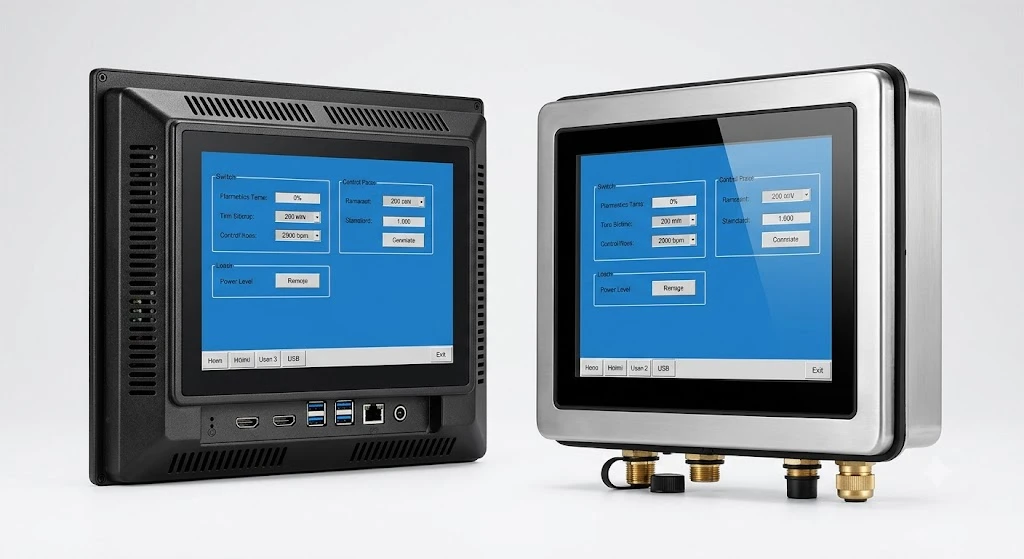
While both configurations outperform commercial desktop screens, selecting the wrong level of protection can lead to catastrophic hardware failure, expensive operational downtime, and voided warranties.
This comprehensive technical guide breaks down the structural differences, ingress protection (IP) ratings, thermal management designs, and total cost of ownership (TCO) between these two industrial pillars, helping you source the exact display technology your operations require.
1. Technical Definitions: Understanding the Core Architectures
To make an informed procurement decision, you must first understand what differentiates these two classes of industrial displays at a structural level.
What is a Standard Industrial Monitor?
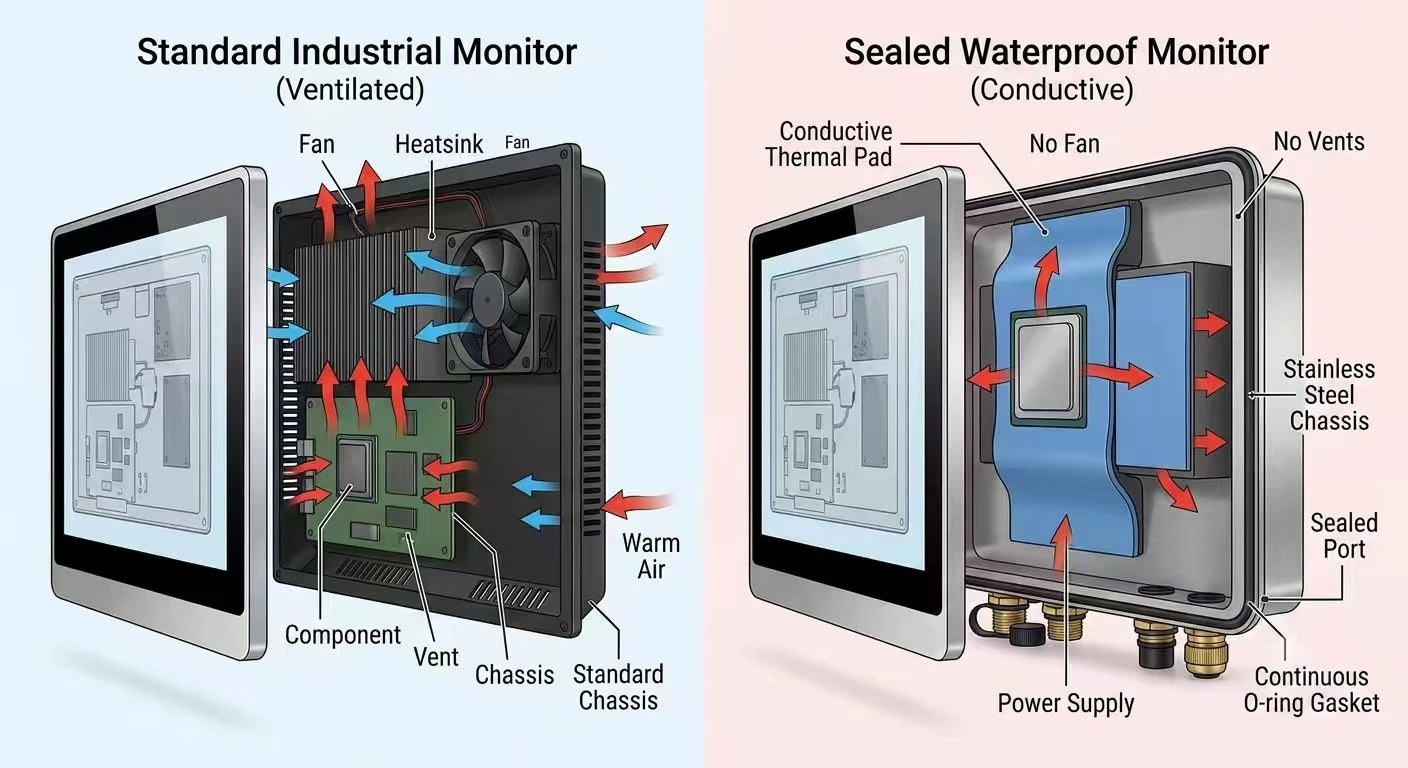
A standard industrial monitor is engineered to withstand continuous 24/7 operation in controlled yet demanding commercial and industrial settings. Built with rugged metal housings (such as aluminum or powder-coated steel), these monitors resist mild mechanical impacts, electrical interference (EMI), and wide operating temperatures. However, they rely on traditional ventilation slots to cool internal components, leaving them vulnerable to direct liquid exposure or high-density airborne particulate matter.
What is a Waterproof Monitor?
A waterproof monitor is an entirely sealed, zero-ventilation display system engineered specifically for environments characterized by high humidity, frequent washdowns, chemical exposure, or outdoor weather. These displays utilize specialized gaskets, hermetically sealed enclosures (often constructed from marine-grade 304 or 316 stainless steel), and watertight I/O connectors. They prevent moisture, water jets, and corrosive agents from penetrating the internal circuitry.
2. Ingress Protection (IP) Ratings & Enclosure Material Standards
The most definitive boundary between a standard industrial display and a waterproof variant is its certified Ingress Protection (IP) rating. This two-digit code, defined by the international standard IEC 60529, dictates exactly how much dust and liquid the enclosure can keep out.
IP [6] [7]
│ └── Liquid Protection Digit (0–9K)
└────── Solid Protection Digit (0–6)
Deciphering the IP Rating Matrix
The First Digit (Solids): Ranges from 0 to 6. Almost all true industrial displays rate at 6, meaning they are completely dust-tight.
The Second Digit (Liquids): Ranges from 0 to 9K. This digit represents the core differentiator for waterproof performance.
Standard Industrial Monitor Ratings
- Standard industrial displays typically feature an IP65 front panel protection rating combined with an IP20 or IP40 rear chassis rating.
- What this means: The front bezel can withstand light splashes or wipedowns when properly flush-mounted into a control cabinet or kiosk. However, the back of the monitor features open air vents. If water drips onto or behind the housing, the unit will short-circuit immediately.
Waterproof Monitor Ratings
True waterproof displays offer full IP65, IP66, IP67, or IP69K sealing across the entire 360-degree enclosure.
- Full IP65/IP66: Protects against low-to-high pressure water jets from any direction. Perfect for marine bridges or light washdown areas.
- Full IP67: Temporarily submergeable in water up to 1 meter depth for 30 minutes. Ideal for outdoor locations prone to flash flooding or heavy pooling.
- Full IP69K: The highest protection grade available. Enclosures withstand high-pressure hot water washdowns (up to 100 bar at 80°C). This level is mandatory for food, beverage, and pharmaceutical processing lines where equipment must be sterilized daily.
Material Selection: Stainless Steel VS Aluminum
Standard industrial monitors frequently utilize lightweight aluminum alloy or carbon steel to balance heat dissipation with structural integrity.
Waterproof monitors upgrade the external frame to 304 or 316-grade stainless steel. 316 stainless steel includes molybdenum, making it highly resistant to chloride pitting and chemical corrosion. This makes it suitable for saltwater marine applications and harsh chemical sanitizers.
3. Deep Dive: Mechanical and Electrical Divergences
The differences between these two display technologies extend far deeper than the external chassis. The internal engineering philosophies are completely distinct.
|
Engineering Feature |
Standard Industrial Monitor |
Waterproof Industrial Monitor |
|
Cooling Mechanism |
Passive convection via airflow vents or internal heatsinks with open airflow. |
Conductive heat transfer via specialized internal thermal pads and the external chassis surface. |
|
I/O Connectivity |
Standard connectors (VGA, DVI, HDMI, DP, USB, DC-in) exposed directly on the chassis. |
Circular, threaded M12/D38999 waterproof connectors or customized cable glands with watertight caps. |
|
Touchscreen Type |
Projected Capacitive (PCAP) or Resistive; optimized for standard bare-hand input. |
Specialized high-excitation PCAP or Resistive; calibrated for thick work gloves and water-droplet rejection. |
|
Optical Bonding |
Optional; used primarily if light reflection reduction is required. |
Highly Recommended / Standard; eliminates internal air gaps to prevent condensation and fogging. |
Thermal Management Without Air Vents
Because a waterproof monitor must be completely sealed, it cannot use cooling fans or ventilation slots to release internal heat. If a standard display monitor is sealed improperly, heat builds up rapidly, degrading the LCD liquid crystals and causing premature LED backlight failure.
To overcome this challenge, waterproof monitors utilize advanced conductive cooling. Engineers attach high-performance thermal pads directly from the internal CPU, power boards, and scalar boards to the heavy stainless steel outer shell. The entire exterior enclosure effectively acts as one massive heatsink, radiating heat away into the surrounding atmosphere.
The Critical Role of Optical Bonding
In humid or outdoor environments, temperature swings cause moisture trapped inside a standard monitor's air gap to condense on the inner surface of the protective glass. This blocks visibility and corrodes internal components.
Waterproof monitors solve this issue through optical bonding. This process fills the internal air gap between the LCD panel and the outer touch glass with an optical-grade silicone or polyurethane resin gel.
Optical bonding delivers three vital operational advantages:
1).Prevents Internal Condensation: Eliminates the air gap entirely, ensuring zero moisture ingress between layers.
2).Improves Outdoor Readability: Eliminates internal reflective surfaces, reducing glare from bright sunlight by up to 400%.
3).Enhances Impact Shock Resistance: The solid resin layer absorbs high mechanical shocks, protecting the fragile LCD panel underneath.
4. Application Analysis: Matching Environments to the Right Monitor
Deploying a waterproof monitor where a standard industrial monitor is sufficient inflates your capital expenditure. Conversely, deploying a standard monitor in a harsh zone leads to operational downtime. Let us examine the precise deployment criteria for each type.
ENVIRONMENTAL SELECTION FLOWCHART
Is the monitor exposed to
direct liquids or washdowns?
┌────────┴────────┐
YES NO
Are high-pressure Is the air humid
chemicals used? or dust highly dense?
┌───┴───┐ ┌───┴───┐
YES NO YES NO
IP69K IP66/67 Full Front
Stainless Waterproof IP65 IP65
Where Standard Industrial Monitors Excel
- Standard industrial displays are ideal for clean, semi-controlled industrial spaces. They are perfectly optimized for:
- Automotive Assembly Lines: Where dust control systems exist, and displays require VESA arm mounting for human interaction without liquid exposure.
- Control Rooms & SCADA Stations: Indoor facilities where operators oversee plant operations from a temperature-controlled environment.
- Textile and Paper Mills: Dry spaces requiring rugged protection against high airborne dust or lint levels, but completely free from liquid contact.
Where Waterproof Monitors Are Mandatory
Waterproof displays are non-negotiable in environments subject to liquid exposure, washdowns, or harsh weather:
- Food and Beverage Processing: Meat, dairy, and beverage packaging lines must undergo daily sanitation using high-temperature, high-pressure chemical washes. Full IP69K stainless steel monitors are mandatory here.
- Marine & Offshore Applications: Ship bridges, open decks, and oil drilling platforms experience constant salt spray, dense fog, and direct wave impacts. These require IP67/IP68 marine-grade 316 stainless steel displays.
- Outdoor Interactive Kiosks: Commercial fueling stations, automated parking toll booths, and outdoor logistics yards are fully exposed to rain, snow, and extreme temperature fluctuations.
5. New Industry Trend: Edge AI Integration & High-Brightness Tech
As industrial automation evolves, waterproof and standard industrial monitors are advancing beyond simple display panels. They are transitioning into intelligent edge-computing interfaces designed for harsh environments.
The Rise of Extreme Thermal Efficiency for Edge AI
With the rise of smart factories, industrial monitors frequently integrate complete Panel PCs containing high-performance processors for real-time machine vision and Edge AI data processing. Running heavy AI algorithms at the edge generates substantial internal thermal energy.
For waterproof monitors, this trend has driven the development of advanced phase-change material (PCM) heatsinks. These materials absorb substantial thermal spikes and dissipate them evenly across the stainless steel chassis without relying on external airflow.
High-Brightness and Smart Dimming Panels
Outdoor and marine waterproof displays now regularly feature ultra-high-brightness LCD backlights, ranging from 1,000 nits to over 3,000 nits. This ensures complete sunlight readability even under direct mid-day exposure.
To prevent operator eye strain during night operations, modern displays include ambient light sensors that offer automatic wide-range dimming (from 100% down to less than 1%).
6. Real-World Case Study: Poultry Processing Washdown Failure
To understand the financial impact of monitor selection, consider this real-world case study from a major poultry processing facility based in North America.
The Challenge
The facility originally sought to reduce initial equipment costs by installing standard industrial monitors with IP65 front bezels into their primary processing and deboning line. The monitors were panel-mounted into control cabinets, assuming the rear vents would remain protected inside the enclosure.
The Failure Mechanism
During daily third-shift sanitation operations, crews utilized high-pressure, chlorinated hot-water sprayers (IP66/IP69K environments) to clean the conveyor lines. Although workers avoided spraying the front touchscreens directly, high-velocity water bounced off the metal conveyors, crept behind the control cabinets through worn door gaskets, and entered the monitors' open rear cooling vents.
The Cost Breakdown
Within 90 days, four standard industrial monitors suffered catastrophic short-circuits due to internal corrosion. The financial impact was clear:
- Replacement Hardware Cost: 4 x $1,200 = $4,800
- Emergency Technician Labor: $1,500
- Unscheduled Production Downtime: 4.5 hours down at $12,000/hour = $54,000
- Total Financial Loss: $60,300
The Solution
The factory replaced the failed units with fully sealed, Full IP66 Stainless Steel Waterproof Monitors with waterproof M12 cabling. Over the next two years of continuous operation, the facility recorded zero liquid-ingress hardware failures, completely eliminating unscheduled downtime on that line.
7. Practical Procurement Steps: Making the Right Investment
Before issuing a Purchase Order (PO) or Request for Quote (RFQ) to your display manufacturer, use this step-by-step checklist to ensure your technical requirements are specified correctly.
Map Out Your Direct Environment
Will this screen experience direct liquid contact, or only indirect mist/humidity?
Identify any specific cleaning chemicals, sanitizers, or saltwater exposure the monitor must withstand.
Establish Your IP Rating Requirements
If the display is completely sealed inside a protected cabinet, an IP65 Front Panel Monitor is sufficient.
If the monitor is mounted on a standalone swing-arm, cart, or open pedestal, specify a Full 360-Degree IP66 or IP67 Monitor.
Choose the Touchscreen Technology for Your Workflows
Resistive Touch: Best if operators wear heavy, thick gloves or if water continuously streams across the screen face.
Projected Capacitive (PCAP) Touch: Best for multi-touch gestures, high optical clarity, and scratch resistance. Ensure the firmware is tuned for palm rejection and moisture immunity.
Verify Your I/O Interconnect Design
Ensure your supplier provides matching waterproof cable harnesses (e.g., M12/D38999 to standard HDMI/USB cables) to connect the waterproof monitor to your internal computer terminals safely.
8. Financial Analysis: ROI & Total Cost of Ownership (TCO)
While procurement managers are often tempted to look only at upfront capital expenditure (CapEx), a proper evaluation requires analyzing the Total Cost of Ownership (TCO) over a standard 5-to-7-year equipment lifecycle.
Expert Insight: "A product's purchase price represents only 20% to 30% of its total lifecycle cost in rugged environments. The remaining 70% to 80% is driven by maintenance, operational energy, installation labor, and-most importantly-unplanned downtime costs."
UPFRONT CAPEX VS. 5-YEAR Opex LIFECYCLE
Standard Industrial Monitor (Improperly Deployed in Wet Area)
[ $1,200 CapEx ] ─── [ $8,000+ Frequent Replacements & Lost Production Downtime ]
True Sealed Waterproof Monitor (Properly Deployed)
[ $2,500 CapEx ] ─── [ $0 Downtime / Flawless Operation ]
As illustrated, paying a premium upfront for a fully sealed waterproof monitor eliminates the recurrent costs of replacement hardware, field engineering labor, and lost manufacturing output. This ensures a rapid return on investment (ROI) within your production facility.
References
- IEC 60529: Degrees of Protection Provided by Enclosures (IP Code). International Electrotechnical Commission.
- NEMA Enclosure Standards: National Electrical Manufacturers Association Standard 250.
- AISI Material Guidelines: Stainless Steel 304 vs 316 Chemical Resistance Specifications. American Iron and Steel Institute.
- Hengstar Technology Whitepaper: Conductive Cooling Methodologies in Sealed Industrial HMI Systems.
Frequently Asked Questions (FAQ)
Q1: Can I use a standard industrial monitor outdoors if I build a protective roof over it?
No. A simple overhead shield protects against direct overhead vertical rainfall, but it does not protect against wind-blown rain, ambient humidity, dew formation, or intense morning condensation. Outdoor environments require a minimum of an IP65 full-enclosure rating along with optical bonding to prevent internal foggy display glass.
Q2: What is the main difference between M12 connectors and standard computer ports?
Standard ports like HDMI, USB, or RJ45 are open friction-fit sockets. They permit moisture and dust to bypass the connectors and short out internal pins. M12 connectors are rugged, circular, threaded metal connectors equipped with internal rubber O-rings. When screwed tight, they create a hermetic, watertight seal capable of surviving high-pressure washdowns.
Q3: Why does a waterproof touchscreen monitor require special calibration?
Water conducts electricity. When water drops settle on a standard capacitive touchscreen, the monitor often misinterprets the water as a human finger touch. This triggers accidental commands or freezes the screen. Waterproof monitors use specialized touch controller firmware calibrated with high-frequency noise filtering. This allows the system to differentiate between an intentional gloved finger press and a running stream of water.
Q4: Does a stainless steel enclosure make a waterproof monitor heavier?
Yes. Stainless steel displays are significantly heavier than standard industrial monitors built from aluminum or sheet metals. For example, a 15-inch stainless steel waterproof monitor can weigh up to 40% more than its aluminum counterpart. When deploying them, ensure your mounting arms, wall brackets, or pedestals are rated to support the extra weight safely.
Q5: Is an IP69K monitor always backward compatible with IP67 and IP65 standards?
Yes. The IP69K rating signifies that the display can survive high-pressure, high-temperature jet streams. This extreme test protocol matches or exceeds the lower-velocity water stream tests used to certify IP66 and IP65 ratings. If a display is fully certified to IP69K standards, it provides comprehensive protection against all lower-level liquid splash threats.