


A wide temperature embedded panel PC combines a display, touchscreen, and industrial computer in a unit that fits into equipment or a control cabinet. A specified operating range of -20°C to 70°C can support installations exposed to cold weather, internal machine heat, or seasonal temperature changes. The range must, however, apply to the complete configuration under stated operating conditions.
For equipment manufacturers, the practical questions are straightforward: will the unit start after a freezing night? Will the application remain responsive in a hot cabinet? Will the display and touchscreen still be usable at both limits?
These are the details worth checking before approving a model.
What Does a -20°C to 70°C Operating Range Mean?
An operating temperature range generally refers to the surrounding air temperature in which the equipment is specified to function. It does not mean the processor, display surface, and housing remain at the same temperature.
Three specifications should be read separately:
|
Specification |
What it covers |
What to confirm |
|
Operating temperature |
Powered operation within stated conditions |
Configuration, workload, brightness, airflow, and mounting |
|
Storage temperature |
Unpowered storage |
Recovery conditions before switching on |
|
Startup temperature |
Successful power-on from the specified temperature |
Cold-start capability, preheating, and startup time |
A storage limit of 70°C does not establish a 70°C operating capability. A system that keeps running at -20°C may also have different requirements for starting after it has been switched off and fully cooled.
For example, Advantech's PPC-3170 datasheet specifies a -20°C to 60°C operating range and lists storage and non-condensing humidity requirements separately. These distinctions matter more than a general "industrial grade" description. [3]
What Makes a Wide Temperature Panel PC Different?
A metal enclosure and fanless design help with industrial integration, but they do not establish the temperature rating. The display, computing hardware, power circuitry, and mechanical assembly all need to support the intended conditions.
Display and Touchscreen
At low temperatures, LCD response can slow down. A screen may still show a clear static image while moving graphics, scrolling data, or alarm transitions become noticeably slower.
At high temperatures, the display must tolerate its own heat and the surrounding conditions. On outdoor equipment, sunlight can raise the front surface temperature above the air temperature.
Touch performance also needs checking with the final cover glass, grounding arrangement, controller settings, and intended gloves. A readable screen is of limited use if an operator cannot reliably select a control.
Computing and Storage
The processor, memory, SSD, and optional communication modules must suit the operating environment. Fitting a wide temperature motherboard does not extend the rating of a standard SSD.
Processor temperature limits are another common source of confusion. A processor's junction temperature limit is not the ambient operating limit of the assembled panel PC.
Power and Mechanical Components
Power converters, connectors, seals, cables, and bonding materials also have temperature limits. Their selection affects how the assembly behaves during operation and repeated heating and cooling.
For buyers, component specifications are useful supporting information. The final evidence should relate to the assembled configuration being ordered.
Standard vs. Wide Temperature Embedded Panel PCs
A standard industrial model may be entirely suitable when the installation stays within its specified limits. A wider temperature range becomes useful when the equipment must operate beyond those limits.
|
Comparison |
Standard industrial panel PC |
Wide temperature embedded panel PC |
|
Operating conditions |
Suitable within the model's stated range |
Supports a broader stated range under defined conditions |
|
Cold startup |
Limited to the specified startup conditions |
Startup at -20°C must be confirmed, including any preheating |
|
High-temperature operation |
Must remain within its rated maximum |
Requires acceptable application performance at the claimed upper limit |
|
Component selection |
Components suit the approved standard configuration |
All fitted components must support the wider conditions |
|
Installation |
Requires the specified clearance and cooling conditions |
Still requires a suitable heat escape path |
|
Procurement focus |
Confirm that local temperatures stay within specification |
Confirm that the wider rating covers the complete ordered configuration |
A wide temperature model does not automatically provide better computing performance or a higher IP rating. Its advantage is the ability to support applications with a wider thermal exposure.
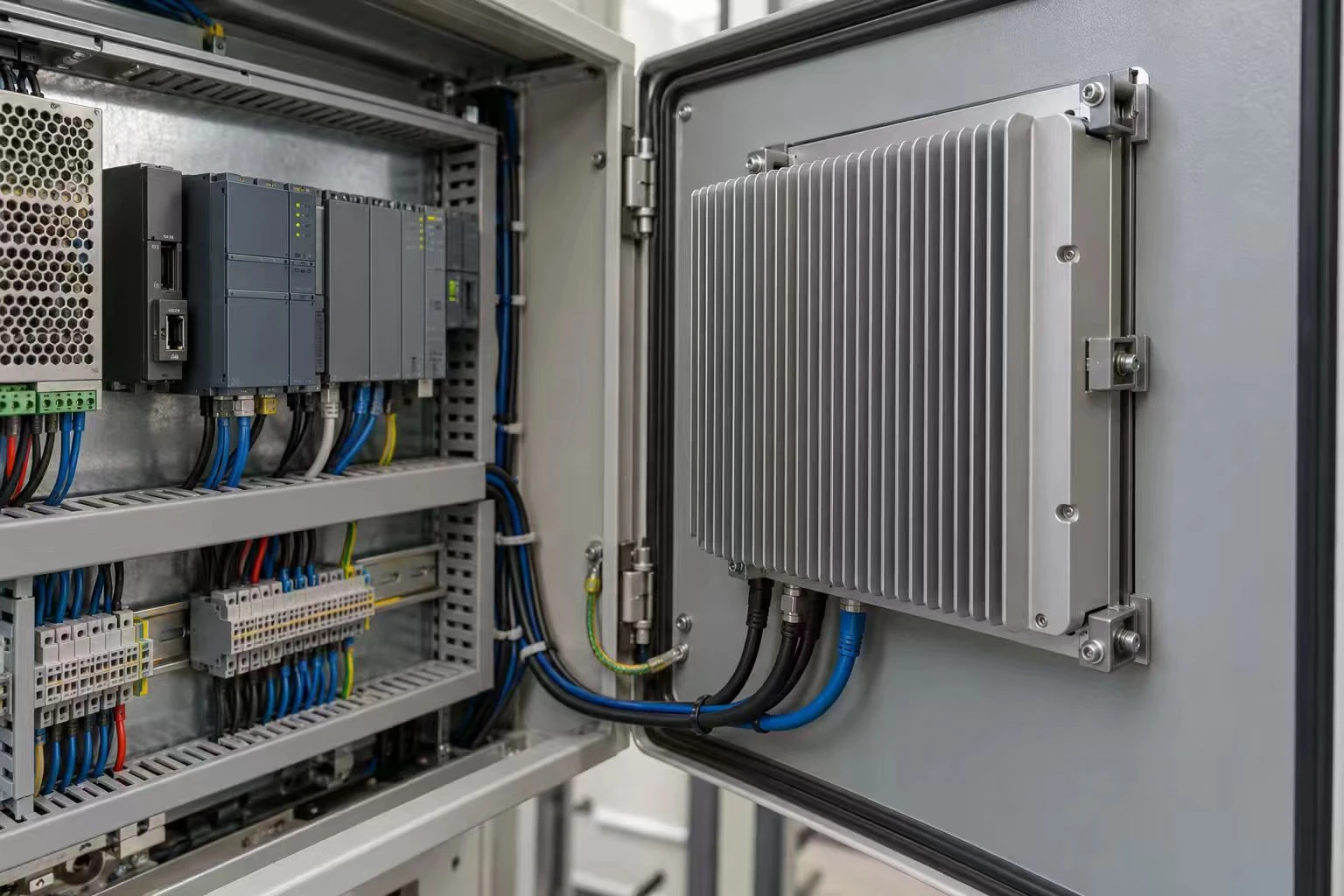
Why Embedded Installation Changes Thermal Performance
A panel PC can operate satisfactorily on a test bench and run considerably hotter inside a machine.
In a fanless system, heat travels through the internal structure to the housing and then into the surroundings. A confined rear compartment, nearby power supply, or obstructed heat sink can reduce heat removal.
A factory room temperature of 40°C therefore tells only part of the story. The air behind the installed computer may be hotter.
Check rear clearance, mounting orientation, nearby heat sources, and cable routing. Where cabinet ventilation is used, confirm that the airflow reaches the panel PC rather than passing elsewhere.
Fanless equipment still needs a path for heat to leave.
Processor selection matters here. For an HMI that mainly displays machine status and exchanges data with a controller, a lower-power platform may be easier to cool than a higher-performance configuration.
 .
.
Low Temperature Operation: Check the First Startup
Cold startup matters most when equipment is switched off overnight.
An operating computer produces heat that can keep internal components warmer than the surrounding air. After a long shutdown, the complete assembly may approach the ambient temperature.
A useful cold-start test begins with the unit powered off and allowed to reach the agreed condition. The test then follows the actual startup sequence, from applying power to making the equipment ready for use.
Check that the operating system loads, storage and peripherals are detected, and the application reconnects to the required controllers. Display response and touch operation should also be assessed at that temperature.
Record the time needed to reach an operational state. If preheating is required, include its power demand and delay in the equipment specification. That delay may affect production startup or unattended recovery after an outage.
High Temperature Operation: Check the Application, Too
At 70°C, keeping the screen on is not a sufficient acceptance test.
Thermal protection may reduce processor performance. This can be acceptable if the application still meets its requirements, but it needs to be measured.
Use a representative workload. Include the intended screen brightness, data logging, network traffic, and connected peripherals. A vision application may need camera input and image processing; a production HMI may need continuous controller polling and alarm handling.
Useful acceptance criteria include interface response time, data update intervals, communication stability, and recovery after a power interruption.
The exposure duration also matters. A brief test at 70°C does not establish continuous operation at that temperature.
Wide Temperature Does Not Mean Outdoor Ready
Temperature capability, ingress protection, and sunlight readability address different problems.
|
Requirement |
What it addresses |
What still needs checking |
|
Wide temperature operation |
Function at specified temperatures |
Startup, workload, and installation conditions |
|
IP protection |
Water and dust ingress through the rated assembly |
Whether protection covers only the front or the complete enclosure |
|
Sunlight readability |
Visibility under ambient light |
Reflections, brightness, viewing angle, and solar heating |
|
Condensation management |
Moisture forming on cold surfaces |
Humidity changes, enclosure design, and operating procedures |
A cold unit exposed to warm, humid air can develop condensation. A specification stating "non-condensing" does not establish suitability for that condition.
Higher backlight brightness can also add heat. For outdoor installations, brightness should be considered alongside optical bonding, reflection control, shading, and installation angle.
Typical Applications and Their Main Concerns
The following are application examples, rather than documented customer projects.
Unheated warehouses and loading areas: Cold startup, glove operation, and moisture changes deserve attention. A terminal near an open loading door may experience different conditions from equipment deeper inside the building.
Outdoor utility cabinets: Water-treatment and energy-monitoring equipment may face cold mornings followed by solar heating. Assess both the exposed front surface and the air behind the panel PC.
Production equipment: Drives, power supplies, and other components can heat the interface compartment even when the factory is relatively cool. Local measurements help determine whether to change the computer, ventilation, or mounting arrangement.
How to Verify the Temperature Claim
IEC 60068-2-1:2025 covers cold testing, and IEC 60068-2-2:2025 covers dry heat testing. Both address powered and unpowered specimens. Their scopes do not establish resistance to temperature changes. [1, 2]
A statement such as "tested to IEC 60068" needs detail before it can support a purchasing decision.
Request a summary identifying the tested hardware, temperature, duration, power state, workload, airflow, and mounting arrangement. The results should state what was checked and what counted as a pass.
Keep the approved configuration on record. A replacement display, SSD, or power component should be reviewed for its effect on the original temperature claim. Where temperature transitions or condensation are expected, agree on additional evaluation.
Contact Hengstar About Your Application
Hengstar offers embedded panel PC customization covering screen size, brightness, touch type, interfaces, and enclosure design. Temperature suitability should be confirmed for the proposed configuration rather than assumed from a general industrial product description. [4]
To begin, share the installation drawing, expected local temperatures, software workload, and interface requirements. Hengstar can discuss a suitable model and configuration quotation. Detailed specifications and drawings can be requested during consultation to support engineering evaluation.
FAQ
1. Can a -20°C to 70°C panel PC start at -20°C?
Only if the specification includes startup at that temperature. Confirm whether preheating is required and how long the system takes to become usable.
2. Can a fanless panel PC operate inside a sealed cabinet?
It can, if the complete installation provides adequate heat removal. The cabinet design and internal temperature need assessment.
3. Does a 70°C rating guarantee full processor performance?
No. Confirm the required workload and acceptable response time at 70°C, including any permitted thermal throttling.
4. Is a wide temperature panel PC waterproof?
That depends on its ingress protection rating. Check the coverage of the front panel, rear enclosure, connectors, and mounting arrangement.
5. What should an OEM buyer approve before ordering?
The hardware configuration, installation conditions, temperature test results, application performance, and process for reviewing component substitutions.
References
1. IEC 60068-2-1:2025 - Cold testing
2. IEC 60068-2-2:2025 - Dry heat testing
3. Advantech PPC-3170 - Official datasheet
4. Hengstar - Embedded panel PC configuration and customization