


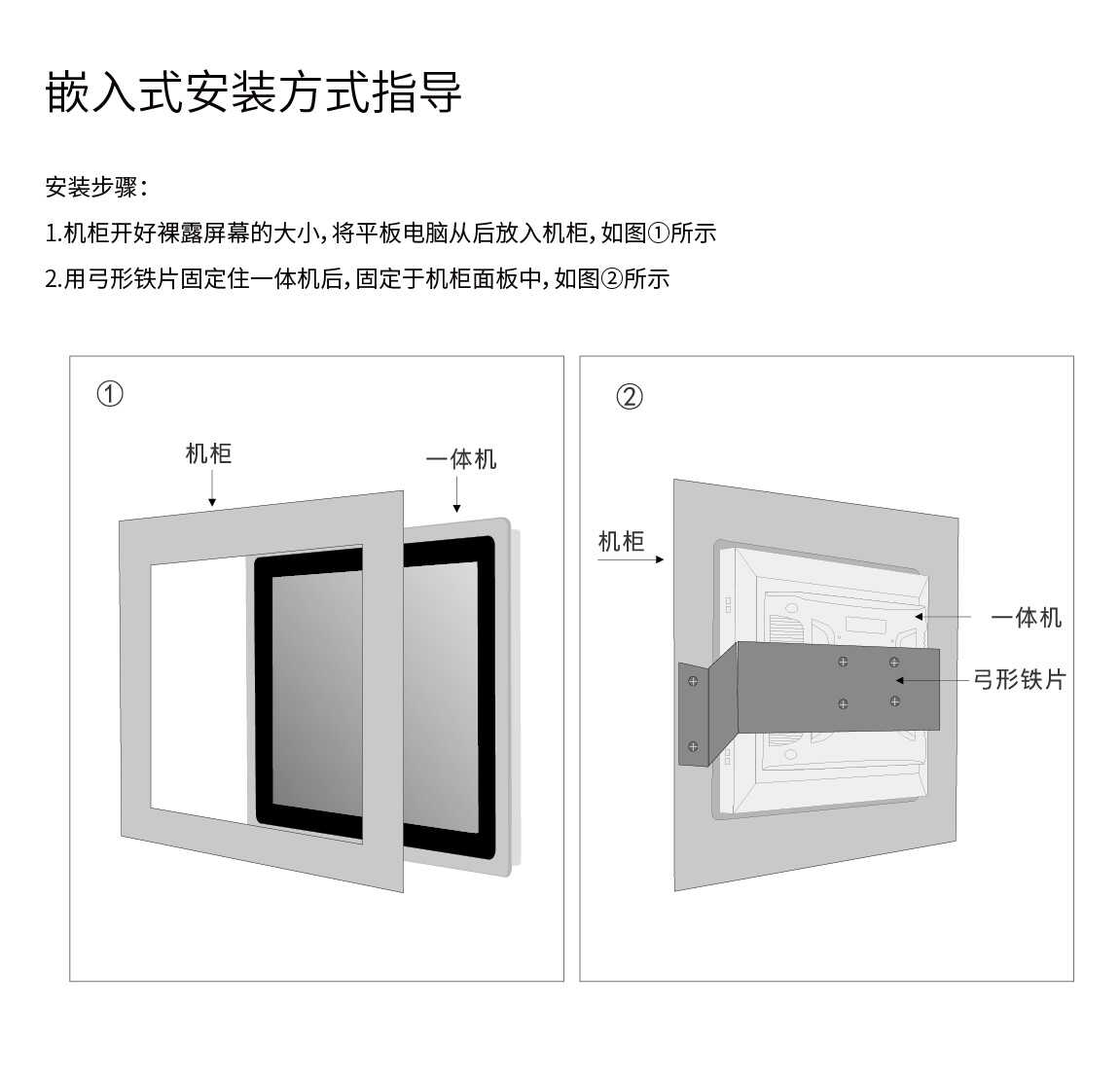
1, Installation of Embedded Industrial Tablets
1. Install screws, screw them into each hole, and confirm if they are tightened.
2. First, place the embedded industrial tablet computer body flat on a stable surface and accurately embed the base into the body.
3. The touch screen should be regularly cleaned. If there is dust or dirt on the surface, a towel or a soft cotton cloth can be used for scrubbing. It is recommended to use a non corrosive cleaning agent for the glass.
4. Before cleaning the screen of the embedded industrial tablet computer, stop using the device and unplug the power plug to ensure that the device is in a power off state, and do not directly use the spray on the screen.
2, Precautions for using embedded industrial tablets
1. Do not place embedded industrial tablet devices in sealed areas, or cover or block device ventilation holes to prevent damage from high temperatures inside the chassis during device operation.
2. Please only use the installation parts and accessories specified by the manufacturer. Avoid stepping on or pinching AC power cords, plugs, or power adapters.
3. Before connecting the power, be sure to check if the host, monitor, and touch screen are properly connected. Only after confirming that there are no errors can the power be turned on.
4. Unplug the power plug of the machine during a thunderstorm or when it is not used for a long time. During transportation and use, try not to touch the LCD screen as much as possible. Please do not squeeze the LCD screen with force, and do not let sharp objects or hard objects cut or damage the LCD screen to avoid damaging it.
5. Due to the fact that most embedded industrial tablets are suitable for public places, unstable voltage may cause equipment damage. It is recommended to use stable mains power and avoid using the same power source as high-power equipment such as elevators.
6. Please do not disassemble or repair embedded industrial tablets by yourself to avoid high-voltage electric shock or other hazards. Professional maintenance personnel should be hired to complete all maintenance work.
7. Please place the embedded industrial tablet in a well ventilated, dry, and direct sunlight environment. Do not expose the embedded industrial tablet to rain or moisture; Leave more than 250px of heat dissipation space around the device, and to ensure normal operation, the continuous switching time should not be less than 10 seconds. Please pay extra attention when using in swimming pools, bathrooms, and kitchen lighting environments.
8. From a physical perspective, it integrates a built-in touch frame, a large-sized LCD screen, a computer host, and supporting teaching software into an all-in-one machine. From a functional perspective, it almost encompasses the functions of all teaching devices. It can also be used in the commercial display industry to play advertisements. Self service inquiry and other functions.
The above content is the installation and usage precautions for embedded tablets. During use, we must also ensure the correct operation method to better guarantee the normal life of embedded industrial tablets. Please refer to the above methods for maintenance.