


Rugged tablet PCs in healthcare and mobile nursing systems have to work both in a nurse's hand and on a cart. At the bedside, the nurse needs to aim the scanner at a wristband and read the patient details without turning the tablet over. Back on the cart, the device must seat in its dock, start charging, and reconnect to any wired printer. A tablet can handle the first task well and still be a poor fit for the second. The screen, scanner, housing, and dock are worth evaluating as one working unit.
Medical tablet specifications that affect daily use
The figures below are published examples from Zebra's ET40-HC and ET45-HC healthcare tablets and their accessories. They give buyers a reference for reading a quotation. A hospital should set its own requirements using its nursing software, printed labels, lighting, and charging schedule.
|
Parameter |
Published example |
What to check on the ward |
|
Display |
10.1 inches, 1920 × 1200, 500 nits |
Can staff see the patient, value, and unit together when the on-screen keyboard opens? |
|
Weight |
699 g |
Fit the proposed strap and cover, then hold the tablet in the wristband scanning position. |
|
Barcode input |
Built-in imager and physical scan key |
Use the smallest medicine code and a curved wristband from the hospital's own label set. |
|
Housing |
IP65, disinfectant-ready materials |
Check the approved cleaning instructions for the screen, housing, and accessories. |
|
Battery |
3.87 V, 7,600 mAh typical, about 29.4 Wh |
Measure time away from the dock and the charge recovered during normal breaks. |
|
Dock |
Tablet connector supports power and data. A charge-only cradle is also available. |
Record the dock part number and where each wired peripheral connects. |
Bedside barcode scanning: start with the hardest label to read
For a rugged healthcare tablet with a barcode scanner, a large code printed on flat paper is an easy demonstration. A better sample is the smallest code the ward uses. On a medicine package, a small GS1 DataMatrix may sit beside another barcode. On a patient's wrist, part of the code may curve away from the scan window. Both can affect how the nurse has to hold and aim the device. GS1 DataMatrix requires a compatible two-dimensional imager or vision system.
For a Data Matrix code, ask about the minimum readable module size. A module is one small square in the pattern. Two codes can have the same outer dimensions but contain different amounts of data. The denser one has smaller modules. Give the supplier the actual printed sample and ask at what distances the proposed scanner can read it. That is more useful than a maximum scan range quoted for a different label.
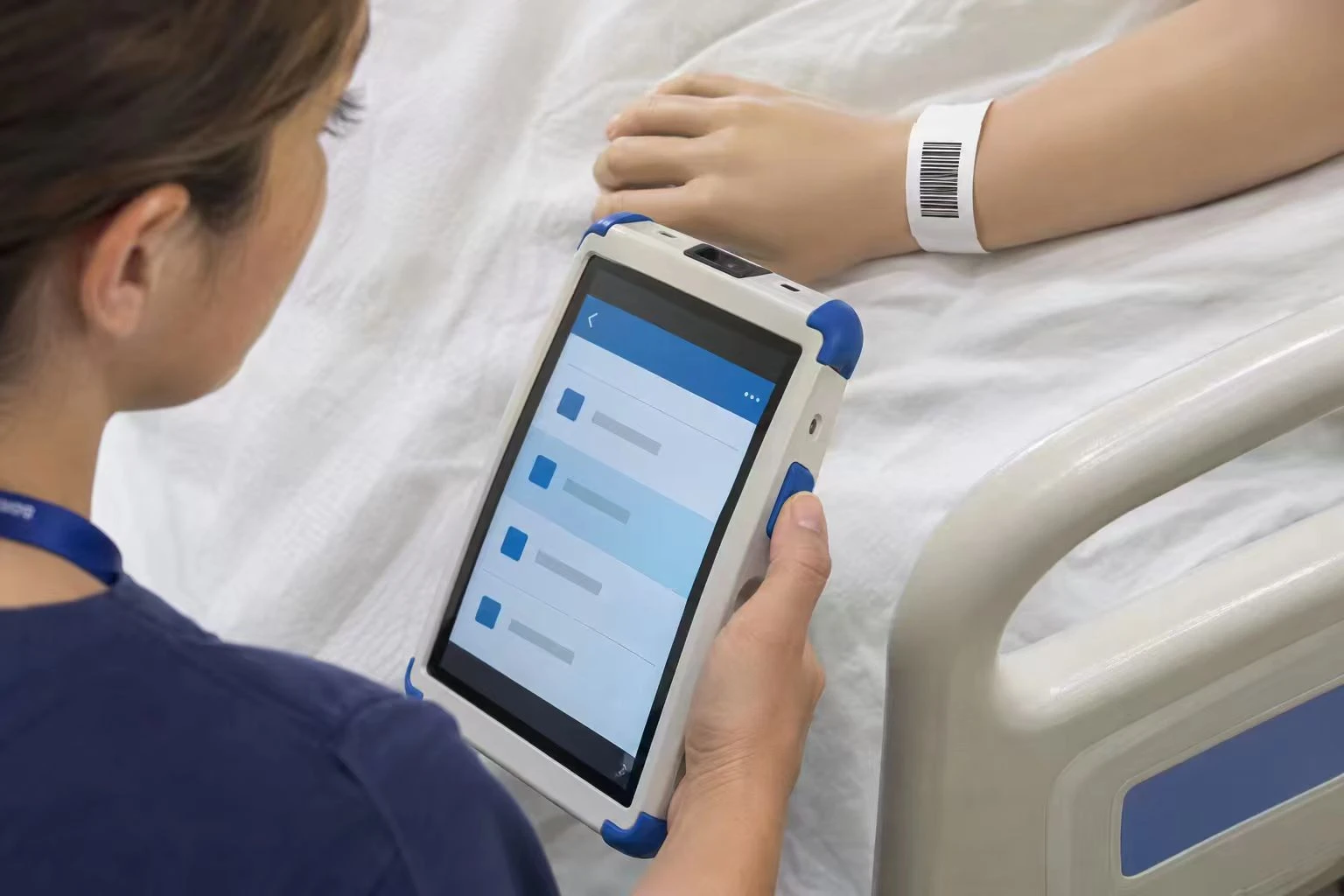
At the bedside, the nurse slips a hand under the rear strap, releases the tablet from the dock, and scans the wristband under the hospital's identification procedure. The screen should stay in view while a thumb or finger presses the scan key. When the medicine package is scanned, the nurse can read the application's response against the active order. The reader's beep confirms capture. The message on screen tells the nurse whether the software accepted the item.
For a sample evaluation, record the code type, module size if known, scan distance, and first-pass reads out of total attempts. Also note any selection of an adjacent code. A reader that captures the wrong symbol immediately has still failed that task. These observations let two suppliers repeat the same trial and give the buyer comparable results.
Cart-mounted charting: how much screen remains when the keyboard opens?
A 10.1-inch, 1920 × 1200 panel gives a nursing application a 16:10 display. How much of the chart staff can use depends on the app layout, text scaling, and keyboard. Open the ward's observation form, tap a numeric field, enter a value, and correct one digit. During that short sequence, the patient details, measurement unit, and save control should be easy to find. If staff wear gloves for the task, test those exact gloves on the smallest field they need to select.
A 500-nit screen is one published hardware example. It tells the buyer the panel's rated luminance. To judge bedside readability, park the cart where it normally stands and look at the glass from the nurse's working height. If a ceiling light falls across the latest reading, see whether the mount tilts far enough to move the reflection. For night rounds, test the lowest comfortable setting as well. Maximum brightness alone says little about using the screen beside a resting patient.
The position of the measuring instrument also matters. In a published ward study, a touchscreen tablet sat on a rolling stand beside a vital signs monitor. Staff read the monitor and entered the values manually. That setup needs space for both displays and a clear view between them. If the hospital wants automatic transfer, the requirement changes: the monitor must have a supported path to the clinical record. Trace one test reading through to the correct patient, value, unit, and time before specifying a cable between the two devices.
Specimen carts: what happens to the printer when the tablet leaves the dock?
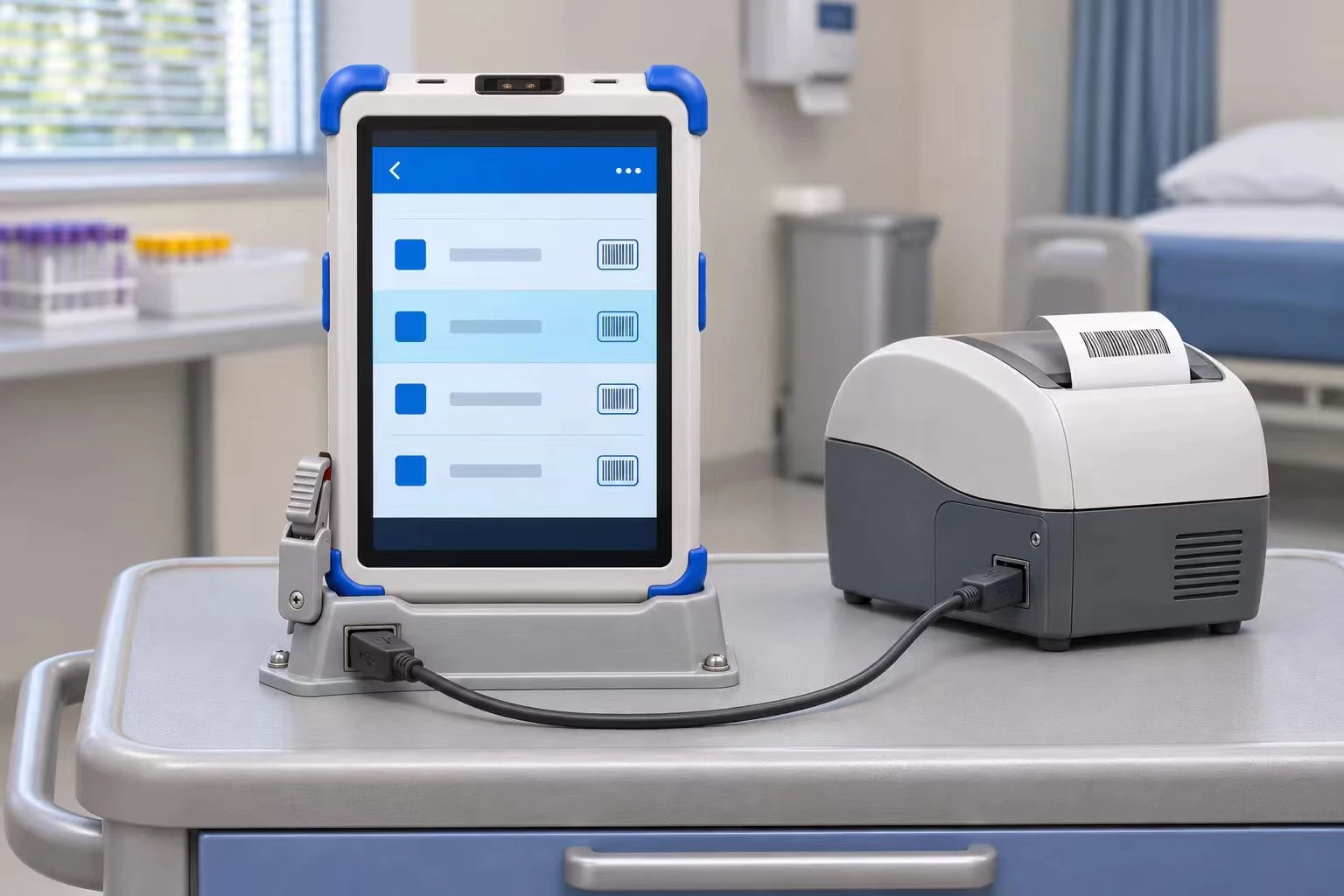
During specimen collection, the printer and supplies can stay on the cart while the nurse takes the tablet to the wristband. After confirming the patient and opening the collection request, the nurse can return the tablet to its holder, keep the request in view, and send the label to the assigned printer. Bedside identification and label printing have been studied together as a way to reduce mislabeled blood specimens.
The decisive detail on the hardware quotation is the dock part number. A tablet may have a connector that carries power and data, yet be supplied with a cradle that only charges it. Zebra's specification and accessory guide illustrate exactly this distinction. If the printer connects through the dock, lift the tablet out with the collection app open, reseat it, and print a training label. If the printer is wireless, repeat the test with a second cart nearby and verify which printer receives the job.
Shared tablets: corner protection, cleaning, and power between rounds
A protective boot changes the tablet's outer dimensions. A rear strap changes how it sits against the back of a dock. If a supplier quotes a drop rating, ask which cover was fitted during testing. Then use that same cover during the cart trial. The nurse should be able to support the tablet as the latch opens and return it without trapping the strap. Check the charging indicator from the normal standing position. A unit can look fully seated while its contacts are just short of making a connection.
For a shared medical tablet, IP65 and disinfectant compatibility answer different purchasing questions. IP65 describes a dust-tight enclosure with protection against water jets under specified conditions. The cleaning instructions establish which agents can be used on the actual materials. Check the ward's wipe against the instructions for the housing, scanner window, screen coating, and strap. The disinfectant's required wet contact time also needs to fit the approved procedure.
Power requirements depend on where the device spends its day. Zebra lists a charging time of under 2.5 hours from 0% to 80% for its 10-inch tablet in a specified single-slot cradle. A ward that docks a tablet for a few minutes at a time needs to measure how much charge those stops actually restore. For community nursing, use the longest planned stretch away from a charger. Record screen brightness, network use, and battery level at the end of the route so the result can be repeated.
When the tablet forms part of powered medical equipment
For a powered cart, the hospital's biomedical engineering team should determine which standards apply to the intended use. IEC 60601-1 covers basic safety and essential performance for medical electrical equipment and systems. IEC 60601-1-2 addresses electromagnetic disturbances. Where applicable, ask for the configuration covered by the documentation, including the relevant supply and accessories. A report identifying only the power adapter leaves the status of the assembled cart open.
Discuss a mobile nursing tablet configuration with Hengstar
For an initial review, send Hengstar a sample wristband or medicine label, the nursing app's display requirements, and a photo or drawing of the cart. Include the printer or monitor model and the cleaning product used on the ward. These details allow the engineering team to discuss a suitable model and configuration, then provide the relevant specifications, drawings, or quotation for evaluation. Contact Us
FAQ
1. When is a separate scanner preferable to a tablet's built-in reader?
If the chart stays on the cart and only the reader needs to reach the patient, a cordless scanner can be easier to aim. A built-in reader is more useful when the nurse needs the screen at the wristband to review the response immediately.
2. Is 500 nits a minimum requirement for a nursing tablet?
It is the published rating of the example models. To select a display, read the actual chart under ward lighting and again at the dim setting used on night rounds.
3. What is the best way to compare two barcode readers?
Give both suppliers the same printed samples and intended working distance. Count correct first-pass reads, retries, and selections of the wrong code. Keep the wristband curved during the test.
4. Should we request a hot-swappable battery?
Consider it when staff spend long periods away from power and need to keep an active session open. If it is offered, change the battery with a training record open and verify what remains on screen.
5. Which parts should be fixed in the purchase specification?
Identify the tablet model, scanner option, battery, cover, strap, dock, power supply, and required interfaces. Keeping an approved sample gives the ward a reference if an accessory changes during a later batch.
References
- Zebra Technologies. ET40-HC and ET45-HC tablet specifications and configuration and accessories guide
- GS1. Scanning requirements for GS1 Data Matrix symbols
- Wong et al. A ward-based time study of paper and electronic documentation for recording vital sign observations
- AHRQ Patient Safety Network. Decreasing mislabeled laboratory specimens using barcode technology and bedside printers
- CDC. Core Infection Prevention and Control Practices for Safe Healthcare Delivery
- International Electrotechnical Commission. IEC 60601-1 and IEC 60601-1-2