


A nit is a unit of display luminance. One nit equals one candela per square meter (cd/m²). If a touchscreen drawing calls for 500 nits and the supplier quotes 500 cd/m², the units match. Before approving the quote, check where the supplier measured those 500 nits. A reading taken on the bare LCD still leaves the brightness of the finished touchscreen to be confirmed.
Where a 500-nit reading comes from
On a test bench, an engineer can display a white square on a gray background and aim a luminance meter at the square. A reading of 500 cd/m² describes the light leaving that part of the screen toward the meter. Move the meter's target just beyond the white square and the reading drops, even though nobody has touched the brightness control. That is why a test report records the image and the point measured. [1]
The screen's diagonal doesn't enter that reading. A 10-inch panel and a 21-inch panel can each measure 500 nits on white. If a machine builder picks the larger panel, there is more room for a trend chart and larger type. A white label on that chart can still have exactly the same luminance it had on the smaller screen.
Out on a loading bay, those same 500 nits may look quite different. Your eyes adjust to the brighter surroundings. Daylight reflected in the front glass can also turn the dark background of the chart a pale gray. The white trace is still there, but the gap between the trace and its background is harder to see.
Nits, lux, and lumens measure different things
A site survey might record 5,000 lux at the face of a kiosk. That reading describes the light falling on the glass. To check the display's own output, an engineer controls the room lighting and aims a luminance meter at a lit area of the screen. Room light reflected in the glass can otherwise contribute to the reading.
|
Unit |
What it measures |
Where you would use it |
|
Nits (cd/m²) |
Luminance in a given direction |
Aim a luminance meter at a white area on the display. |
|
Lux (lx) |
Light falling on a surface |
Place a lux meter at the screen position, with its sensor facing outward in the same plane as the glass. |
|
Lumens (lm) |
Total visible light output, weighted for human vision |
Compare the rated light output of projectors or lamps. |
Keep the lux reading with the site notes, along with the time of day and a photo from the customer's eye level. Two sites can have the same illuminance at the glass while only one faces a bright window. That distinction matters when a supplier tries to reproduce a complaint on the bench.
Reading the brightness line on an industrial monitor quote
Hengstar's spec sheet for the 21.3-inch HSIM-2136-RM lists two brightness values under "LCD panel." The first is 350 cd/m². The second, 1,000 cd/m², carries the word optional. Both belong to the same model number. A purchasing team could copy that number correctly and still leave the brightness option out of the order.
For a touchscreen order, ask the supplier directly. "With our cover glass fitted, what minimum brightness will you guarantee at screen center?" Put the agreed value beside the selected brightness option on the drawing. When the shipment arrives, the inspector can test the unit as delivered, with the glass in place.
|
Wording on the specification |
What to clarify before comparing quotes |
|
Typical brightness |
What minimum, if any, will the supplier commit to for the quoted configuration? |
|
Center brightness |
Which other points were measured? This matters if a status bar or alarm field sits near an edge. |
|
Panel brightness |
Were the touch sensor and final cover glass in place during the measurement? |
|
Peak brightness |
What area was white, for how long, and in which display mode? |
Peak brightness vs. sustained brightness
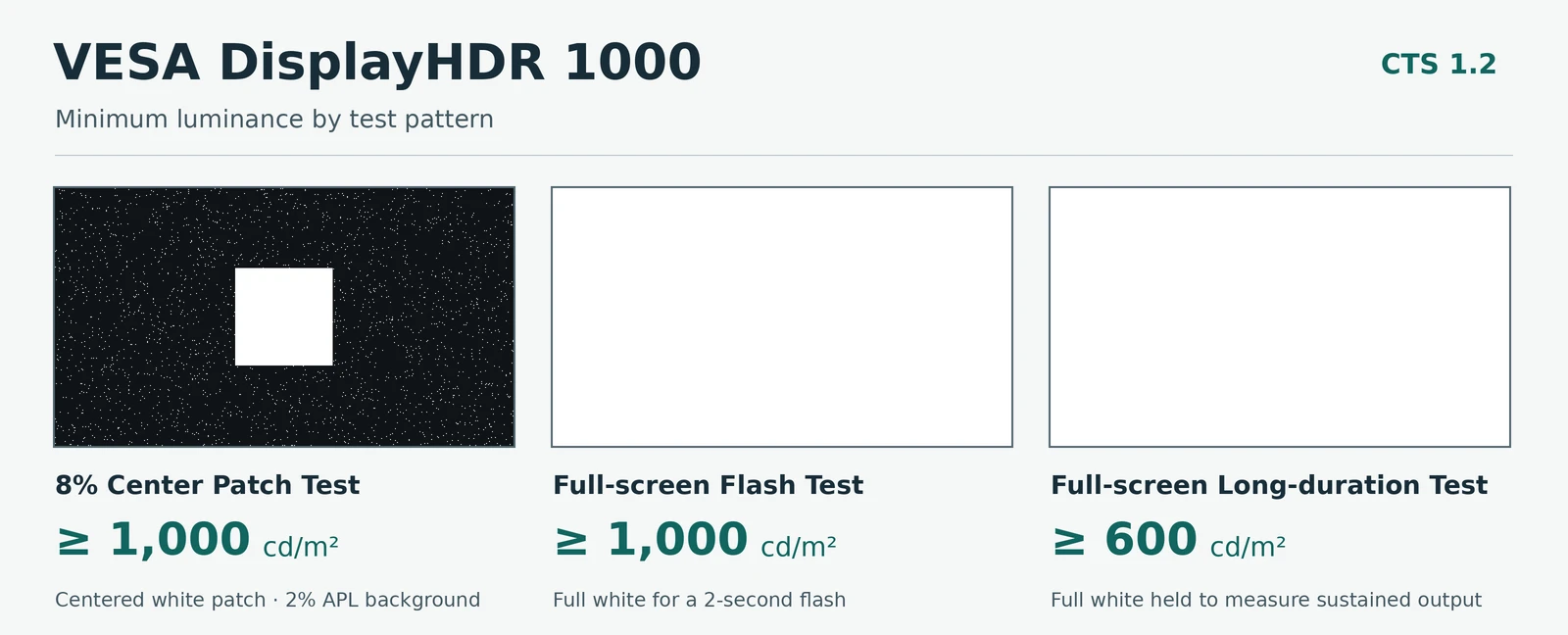
VESA's DisplayHDR 1000 tier gives a precise example. Under version 1.2, the minimum is 1,000 cd/m² for the 8% center patch test and for a brief full-screen flash. For a full white screen shown over a longer period, the minimum is 600 cd/m². These are certification thresholds. An individual monitor can exceed them.
On a factory line, the demanding image may be an ordinary inspection form. Its white background fills the screen and stays up while an operator works through a batch. For that job, ask how bright a full white screen stays in the standard display mode used by the inspection software. A peak measured on a small HDR highlight answers a different question.
How many nits do you need for an industrial touchscreen?
On an EV charger, a useful place to judge readability is the decimal point in the price. The battery icon is large enough to see from several steps away. The decimal point has to remain clear from the spot where a driver stands to pay. Under a canopy, those two parts of the screen can catch very different reflections.
Suppose a strip of bright sky runs across the price. Try tilting the sample a few degrees while someone stays at the payment position. If the reflection moves off the digits and the price becomes legible, try the new bracket angle before ordering a brighter panel. If the whole interface still looks faint after the reflection moves, compare backlight options at that same angle. Optical bonding is also worth testing when internal reflections are present. Clear adhesive fills the air gap behind the cover glass or touch panel, while the outer surface remains exposed to reflections.
An indoor control panel calls for a different trial. If the night shift uses the same machine as the day shift, hand the 350-nit sample to an operator with the work light on. Can they read the smallest batch code? Later, under night lighting, can they dim the screen enough to read a fault message and then look back at the machine comfortably? Those two observations give the buyer a reason to accept that brightness range or ask for another one.
How to measure screen brightness on a finished unit
A bench measurement lets two suppliers' samples be compared on equal terms. A check on the machine tells you whether the operator can use the one you choose. Keep both results on the sample record, with separate fields for screen luminance (cd/m²) and site illuminance (lux).
- Fit the cover glass, touch sensor, and enclosure specified for production. Write down the display mode and brightness setting. If automatic dimming is enabled, switch it off for the fixed-setting comparison.
- Feed each sample the same full-screen white image. Once output settles, take a center reading head-on with a luminance meter. Record the temperature and elapsed time. If the application has an alarm strip near an edge, mark that position and measure it on both samples.
- Open the production interface at the operator's usual working distance. Check a task where a reading error matters, such as telling an active control from a disabled one. Record which control you checked so the next sample gets the same test.
- Restore automatic dimming if the machine uses it. Look at the same screen under daytime and night lighting. Save the meter readings with the approved configuration and note which items the operator could read in each condition.
If you are comparing Hengstar configurations, send a photo taken from the operator's position along with a screenshot of the hardest detail to read. A target in nits is useful, especially if the drawing says where to measure it. With those details, Hengstar can propose a model and brightness option, prepare a quote, and provide the relevant datasheet or drawing. Contact Hengstar
FAQ
It is twice the measured luminance under the same conditions. It may not look twice as bright to a person. Surrounding light and the viewer's state of adaptation affect that judgment.
Can I convert my monitor's brightness percentage to nits?
A setting of 50% on a 500-nit monitor tells you where the slider sits. To put a value in cd/m² beside it, you need the brightness curve for that model and mode, or a meter reading at 50%.
Is 1,000 nits enough for direct sunlight?
A 1,000-nit rating alone cannot establish sunlight readability. Test the finished unit at its intended site and mounting angle before setting the minimum for production.
Can a phone app measure monitor brightness?
An app that reports lux from the phone's ambient light sensor measures light reaching that sensor. To verify a monitor specification in cd/m², use a calibrated luminance meter aimed at a defined screen area,Hengstar also can be customize the brightness up to a maximum of 3,000 lumens based on customer needs..
What should a buyer write in a brightness requirement?
Specify a minimum value and a repeatable test. For example, "At least 700 cd/m² at screen center, measured through the production touch glass with full-screen white in standard mode after output stabilizes at 25°C ambient." Replace the example value and conditions with those agreed for your project.
References
- Radiant Vision Systems - Light and color measurement fundamentals (PDF)
- International Commission on Illumination (CIE) - Brightness–luminance relations
- Hengstar - High Brightness Monitor specification, HSIM-2136-RM
- VESA - DisplayHDR performance criteria under CTS 1.2
- EIZO - Optical bonding and display visibility